Search This Blog

Showing posts with label Internet Dating. Show all posts

9/4/13

Stop Plenty of Fish POF App New Matches Alert on Cell Phone


Introduction to Stopping Cell Phone Match Notifications of POF

OK, so you are looking for love on the Plenty of Fish website but at the same time you don't want to be overwhelmed with information, spam, unnecessary message, etc etc coming directly from Plenty of Fish ( POF ) to your cell phone

I ran into this sometime back when I loaded the Plenty of Fish ( POF ) application and I started getting every single new matches alert on my cell phone.  I do like the POF site but honestly their daily matches so to speak doesn't really do much for me let alone have it vibrate, make a sound, light up the screen, etc on my cell phone every time.

So to stop the new matches alert on you cell phone just follow these steps.  I have the LG Lucid Cell phone but this process should work on other variations of smartphones too. Give it a shot. It might not be the exact fix for your cell phone but it might be close enough to help you out.

OK....

Step One 


Menu Button On Lucid Cell (just above my index finger)
After you log into the POF app , you'll be on the home screen.  Your cell phone should have a menu button on it.  On my cell phone it is the the lower left button with the little square on it on the cell phone.

Press that button

Step Two 

A menu will pop up.  Look for SETTINGS on your cell phone screen and press it.

Step Three

Another menu will appear. Scroll down (or up) until you find NOTIFICATION SETTINGS

Step Four

Uncheck  NEW MATCHES

That's It!

Now going forward your new matches alert from POF will not vibrate, ring, light up, etc on your wireless smartphone.


 Want to Learn More POF Tips and Troubleshooting?

Hide Your Profile on Plenty of Fish 

Can I Block a User From Seeing Me on POF

1/3/13

Can't Log Off Match.Com Always Logged On Match

You like searching for love on Match.com but you find that you are logged on all the time right? For some reason you are not being logged off Match.com. That is, when others view you it says something line " online now " but you aren't even on your computer or using the related application on your cell phone. This could be embarrassing if you think you have found that someone special and they take notice that you are still searching for a date on Match 24 hours a day, 7 days a week.

There are a number of reasons why Match isn't logging you off. One reason there is no sign off is that when you are searching the site on your PC or Mac you are failing to log off before closing the website's window on your computer screen. This is probably too simple of an explanation though. I think your real problem here is that you've installed the Match.com app on your cell phone and the app you are using it a little tricky to use when it comes to logging on and logging off.

A quick way to double check this is to go to the Match app icon on your cell phone touch screen and press the icon. Once the app opens determine if it is asking you to log in or are you logged in right away? If you are logged in right away, the issue is that you are not logging out of the application before you close it. In other words, you are just pressing the back button on your phone, or closing the app without actually going to "Log Out" or "Sign Off" button

At least as of today's date I find the Match app pretty tricky to log out. Here is what I suggest:

Step 1

First, keep in mind that I am doing this on an LG Lucid cell phone but I suspect it will work the same on any phone. OK try this.....

When you are done browsing views, profiles, interests, photos, etc look to see if there is a "Menu" tab on the bottom of your screen. Don't press the menu tab, just see if one is there.


Step 2 - Not Seeing The "Menu" Tab

If you are not seeing the "Menu" tab press the back button on your cell phone. On the LG Lucid it is the bottom button with the arrow turning on itself. This button is next to the search (magnifying glass) button.

Press the back button until you see the "Menu" tab at the bottom of the screen. Again, don't press menu

Step 3 - If You See The "Menu" tab
Once you see this button go ahead and press the menu button on your cell phone. NOTE, do Not press the menu TAB on your cell phone touch screen, only press the menu button on your cell phone. On the LG Lucid this button is on the bottom far left with the square on it. It is not a button or icon on the application itself, it is
the one on the cell phone.

Step 4 - Refresh Settings Help

When you press the button the application should give you the option of "Refresh Settings Help" Press "Settings"

Step 5 - Press Sign Out

Then press "Sign Out" If you can't find "Sign Out" don't worry, you aren't the only one that struggles with this one. You'll see visibility settings, user info, text alerts, notifications and above all of that, in the upper right corner of the screen is the "Sign Out" button. Press it and you'll be signed out.


I hope that helps. Please Check Out Some Other Match Dot Com Tips Below

2/28/12

Change Online Dating Email on Match.Com

Match.Com is a super popular online dating site.  A lot of people look for love on Match on a long time and along the way they need to make changes to their personal account information.

All notifications from Match.com are available to come to your via email.  If someone is interested contacting you it will happen through email. If someone wants to wink at you on Match you have the option of getting winks email to you. If you want Match to recommend partners for you, you can get the recommendations through email.

Sounds like email is pretty important right? It is!  The last thing you want to do is forget to change your email on Match.com if you need to.

Changing your online dating e mail takes more steps that you think. Fortunately, this article will have you updating a new mail address in no time.

Step 1 - Log In

Log onto your Match.com account as you normally would.

Step 2 - Find "Account"

Look to the upper right corner of your screen and find the  word "Account"  Click on "Account"

Step 3 - Account Drop Down Choices

In the drop down box that appears click on "Settings"


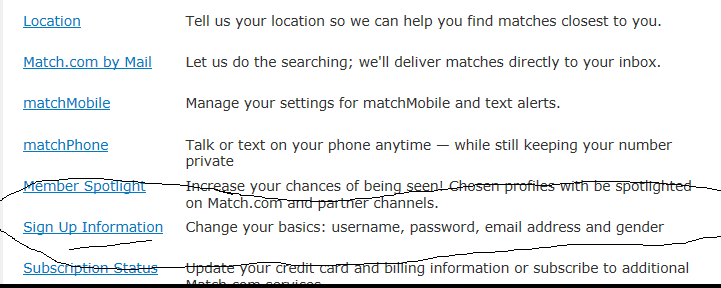
Step 4 - Sign Up Information

Then looks for "Sign Up Information" 

"Sign Up Information" is toward the bottom of the screen (at least as of the date of this post).  Click it.


Step 5 - Re-Enter Your Password

Enter your password in the space provided. I know, you are already logged in but Match will ask you for your password again as an extra measure of security and privacy.

Step 6 - Sign Up Information Screen

In the sign up information screen, click the button that reads "Change Sign Up Info"

Step 7 - Change Your Email Address

A block will appear with all of your personal information. Look for the box that contains your email address. Go ahead and change your email address and click the "Continue" button

You're Done!

If everything has been done correctly the screen will read "You've updated your sign up information correctly"  Your email address is now changed on Match.com

I hope that helped.  Now comes the waiting game as you hope that someone special, that someone who pines away for your love, will send you a romantic (or at least really funny) email.

Good luck in your online dating search for love.

Please Check Out These Other Posts on TurtleDogs Blog

Ever meet someone online that just freaks you out?  That internet stalker? That dubious person you have a bad feeling about?  Does this person not want to leave you alone? Do they keep contacting you on Match but you want to block them?  I've been asked a number of times if you can block a certain individual from contacting you on Match.com.  I wrote an article telling you what you can do

How Prevent Emails From Someone on Match .... Can You Stop Them From Checking Your Profile Too? Find Out

Ever Get Those Daily Matches from Match.com and you are asked to select if you like the person, don't like the person or if they are a "Maybe"?  You might be wondering if that person is notified?  Are they? Well... maybe, maybe not. Click link below to find out

If I Select "Maybe" When I See My Daily Matches..... Does The Person See This?

1/15/12

Block Specific Person From Match Profile - You Can't - What To Do

If you want to block a specific user from viewing your Match profile you can not block individuals at this time. You might think you are, but your can't.

Match.com is one of the best paid Internet dating sites that I can think of.  I don't represent Match or anything like that, nor am I acting as a marketing arm for this site nor am I bashing it. I just happen to think it is a pretty decent site for the money you pay but it would be nice if they would let you name the users you want to block from checking out your photos and information.

As with any Internet dating site, you can run into situations where there are people you simply do not want looking at your profile.  Maybe it is a a coworker, or ex-boyfriend or ex-girl friend, or maybe just a psycho ? 

There are ways to completely remove your profile from view on Match.com. I wrote an article on how to do this and it is easy to do but 'completely' removing your profile keeps everyone (even the good people) from contacting you.

If you just want to block a specific, certain, person from seeing your Match profile it can not be done but you can keep them from emailing you. This is the next best thing and can really send a message to that person to leave you alone.

1. Log in to you Match.com account

2. Find the person you want to hide your profile from. Open their profile

3. Look on their profile page for the link "Block from Contact"

4. Click on this and they are now blocked from contact. You won't hear from them via email on this site again.

Of course, if you already gave them your cell phone number or personal email, you're stuck for a while. I can't help you on the home email thing but if you gave them your cell number you might be able to block through your wireless provider real quick and simple.

Here's How I Blocked a Stalker Once From Calling My Cell Phone

The site Plenty of Fish also has an option block specific people from emailing you (but they can still view your profile if it is public).  I posted an article on how save yourself some aggravation and keep that person from messaging you. I linked it here.

Block User From My POF Profile View and Email

If you want to block a specific person from viewing your profile on Plenty of Fish ( POF ) you might be disappointed at least as of the date this article was published.  You really can not block specific users from viewing your profile at this time. 

Match.com is set up the same way. You can hide your profile on Match from everyone or and you can stop a specific person from sending you messages on Match but you can not at this time block a specified user from checking out your profile.


Don't fret though. You still have some options on your POF account to keep a problem user away. Here some ideas:

1. You can always remove your entire profile from view. I wrote a post on how to do this.  The upside to this is that no one can see your profile ... however those you've favorited, those that have mail in your mailbox,  people who have favorited you, people you have favorited and, if you've already taken down your profile becareful of this one ... those you contact AFTER you've taken down your profile,

The downside to this, of course, is that while you've hidden your entire profile from everyone, no one will find you.  If you need a break from POF this is great but if you are still searching for love you've essentially taken yourself out of the game.

2. The best way to keep a certain person from contacting your on Plenty of Fish is block them from emailing you.  This is the next best thing to hiding your profile and will definitely send a message that you do not want to hear from this person anymore.  Blocking them from messaging you is easy to do, the only downside being you will need to still have email from the person you want to block.

Here Are The Steps:

-Go to the message that the person sent you and open it.

-Scroll all the way down the page.

-Look for the "Block User" link at the bottom right.

-Click on "Block" User

-Now this person is prevented from emailing you.

Keep in mind that this person 1) Can still see your picture, description, etc. They just can not contact you via messaging. 2) If you have deleted the message or the user never sent you an email in the first place, you will not be able to stop them from contacting you.  I'd suggest, in this case, let them send you a message then "Block User" their butt :-)

Keep in mind if you already gave this person your cell phone number, you'll need to take other action to block them from calling you via your cell phone provider. I did this through Verizon once and it was so easy, I wrote a post about on how to block calls.

I hope that helps.  Here are some other Tips on Internet Dating by TurtleDog


More Great Posts on TurtleDog's Blog

How to Hide Your Profile Completely on Plenty Of Fish

Stop Cell Phone Calls From a Specific Person's Phone

Hide Your Profile On POF Plenty of Fish Easy

If you want to hiding or removing your profile on Plenty of Fish aka POF is easy to do.  For those of you not aware of POF, Plenty of Fish is a free dating site that just about anyone join.  You just need to create a profile describing yourself and then start searching profiles for that next significant other in your life.


A profile is generally consists of a photo or photos (optional) of yourself and a description of what you are like and what you are looking for.  It can be really revealing, some are extremely revealing both in the pictures and in the descriptions or just a simple description ("I like dining out and the color red, email me sometime." etc)


There are a number of reasons you might consider for taking down your information, at least temporarily, on POF. Here's a couple I thought of but there are many more.


-If you have been on POF a long time you might want to take a break.


-You may have found someone you really like and want to see where things go. Keeping your information up on the site might send the wrong message to this person that you are still 'looking'


One Snafu....You might have someone bothering you and you just want to remove your entire profile from everyone's view until things cool off.  Keep in mind though, if they have contacted you (ie they have mail in your inbox) or have you on their favorites list, this won't work. They can still see you.  It's a weird thing POF does and I'm not sure why.   If someone repeatedly contacts you, can block them from emailing you. Scroll to the bottom of this post and find the link below to learn more about keeping POF members from emailing you.
OK, here are the steps that will let you hide your profile on Plenty of Fish ( POF )

Note... here's an odd update.... as of recently (10/9/13) someone mentioned that you can no hide your profile unless you are an 'upgraded' (ie paying) member.  Isn't that strange?   So you have to pay to hide your profile.  The only workaround I can think for this, without paying,  is to severely edit your profile so no one can find you.  Delete all of your pictures, change your address to the North Pole or something and make other alternations so no one knows you or can find you.  I'd suggest saving on your hard drive, copy and paste whatever, anything you don't want to reproduce in terms of your story, pictures, interests, etc.  

If you are a paid member or if you just want to try without paying, do this:


Log in

Got to “Edit Profile” at top of screen
The page that opens will be a section where you can modify what your profile says.  You should already be on the “Edit Profile” tab but if not click on that tab

Here’s the tough, part, the part where I thought for a moment that  I was going blind.  Find the link “To hide your profile from others click here” and click the “Click here” portion of that link.  I had a tough time finding this but it is really just below the "Edit Profile" tab and next to the text “Hiding your  profile"   

I included an image below to show you the link is (circled) to make your profile invisible.

That’s it.  You are now removed from all searches.